Version 6.4
Changes in Version 6.4
Version 6.4 included, among other things, the following new features:
- Sending timed MIDI events
- Control with face gestures
- Importing metadata from MIDI, MP3 or ChordPro files
- Keyboard control for Genos, Tyros and Korg at the push of a button, not only when opening the song
- Ableton Link support
- Improved display of ChordPro files
- Importing XF chords from MIDI files with a separate bass note
- Alphabetically sorted list of books
- Option to automatically remove the tag filter after a successful search
- New actions for function buttons, gestures and foot pedals
- Improved foot pedal function for function button groups
- Proportional font during import now also applies to ChordPro files without chords
Sending Timed MIDI Events
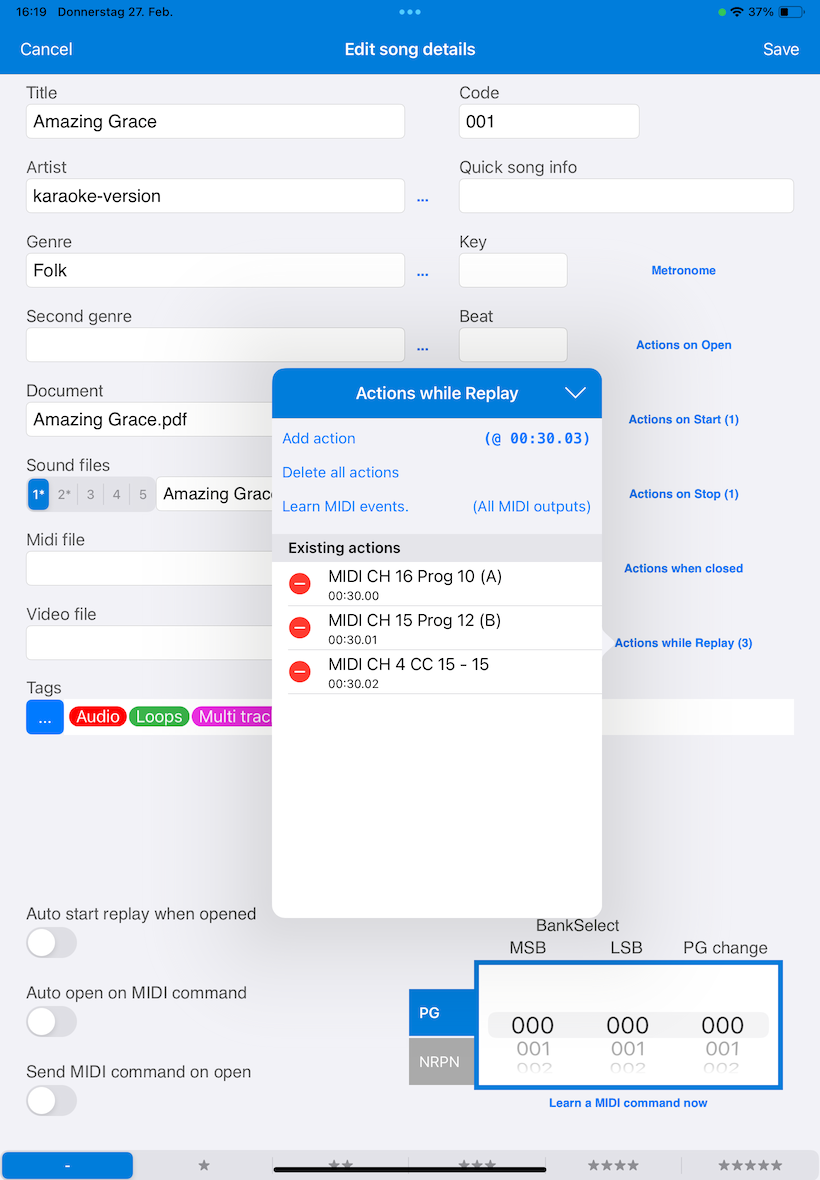
If you want to send MIDI events at a specific time, for example to switch on an effect in a MIDI-capable device or select another lighting scene in a lighting system, this was previously only possible via a MIDI file that was played in parallel with the song.
There is now a button "Actions during playback" in the song editing window. There, MIDI events can be entered that should be triggered at a specific time.
The events can be entered manually or recorded using a learn function. Optionally, individual MIDI events can also be sent only to a specific MIDI output.
Control with Face Gestures
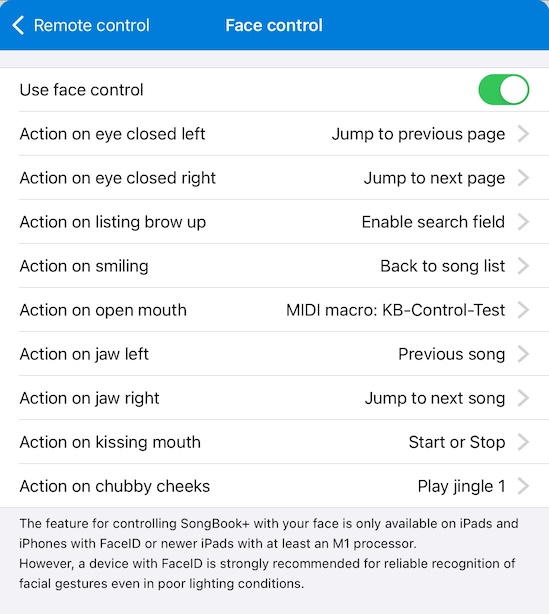
On iPads or iPhones with Face ID, or newer iPads with at least an M1 processor, SongBook+ can now be remotely controlled with face gestures.
SongBook+ recognizes nine different face gestures. For each gesture, you can define what it should trigger.
For example, you can turn one page forward by winking with the right eye, turn one page backward by winking with the left eye, or start playback with a kiss mouth or smile.
If it should also work in poorer lighting conditions, a device with Face ID is especially recommended. Face ID can scan the face in 3D with an infrared camera and therefore works more reliably than a normal front camera.
Importing Metadata from MIDI, MP3 or ChordPro Files
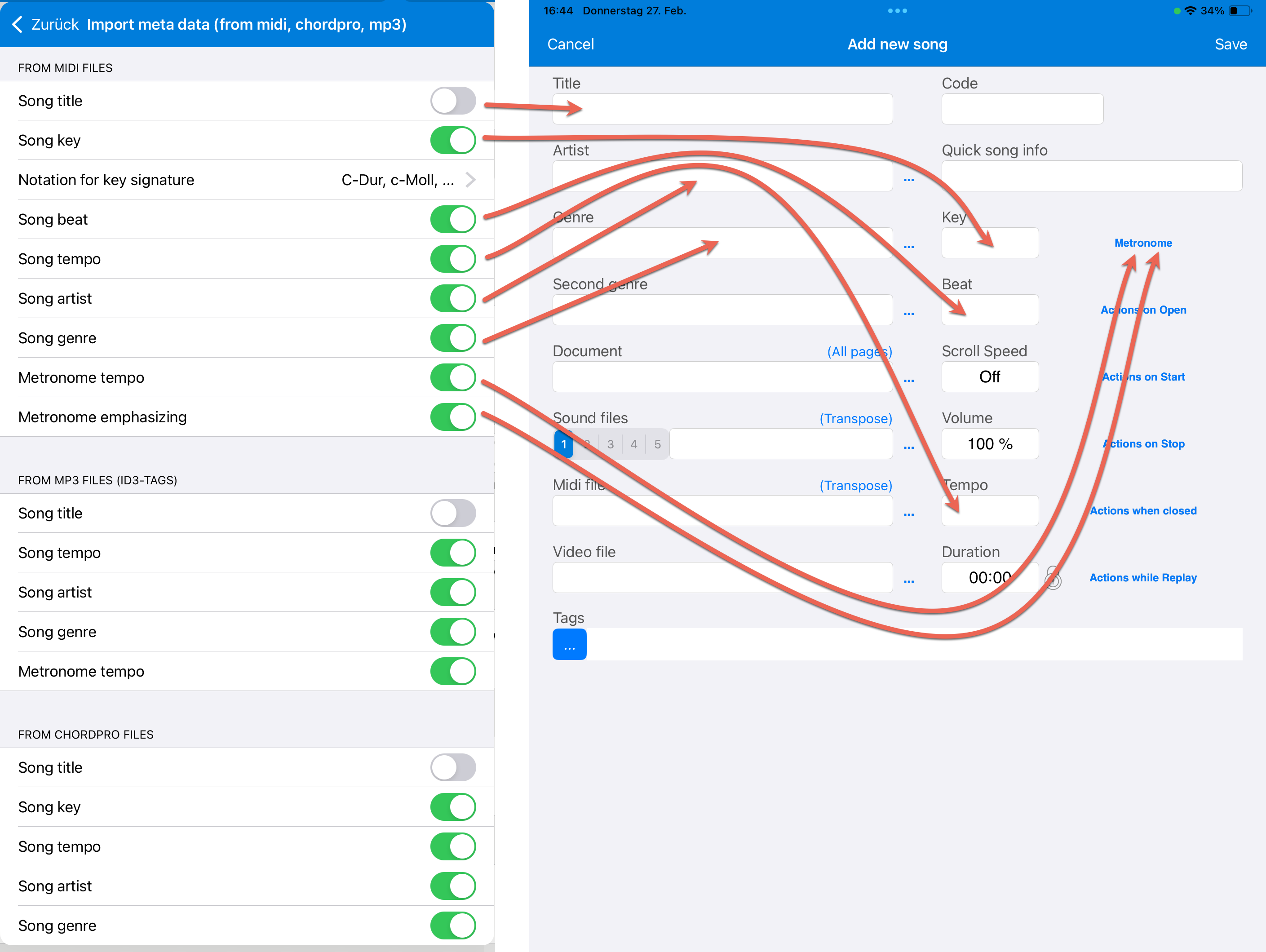
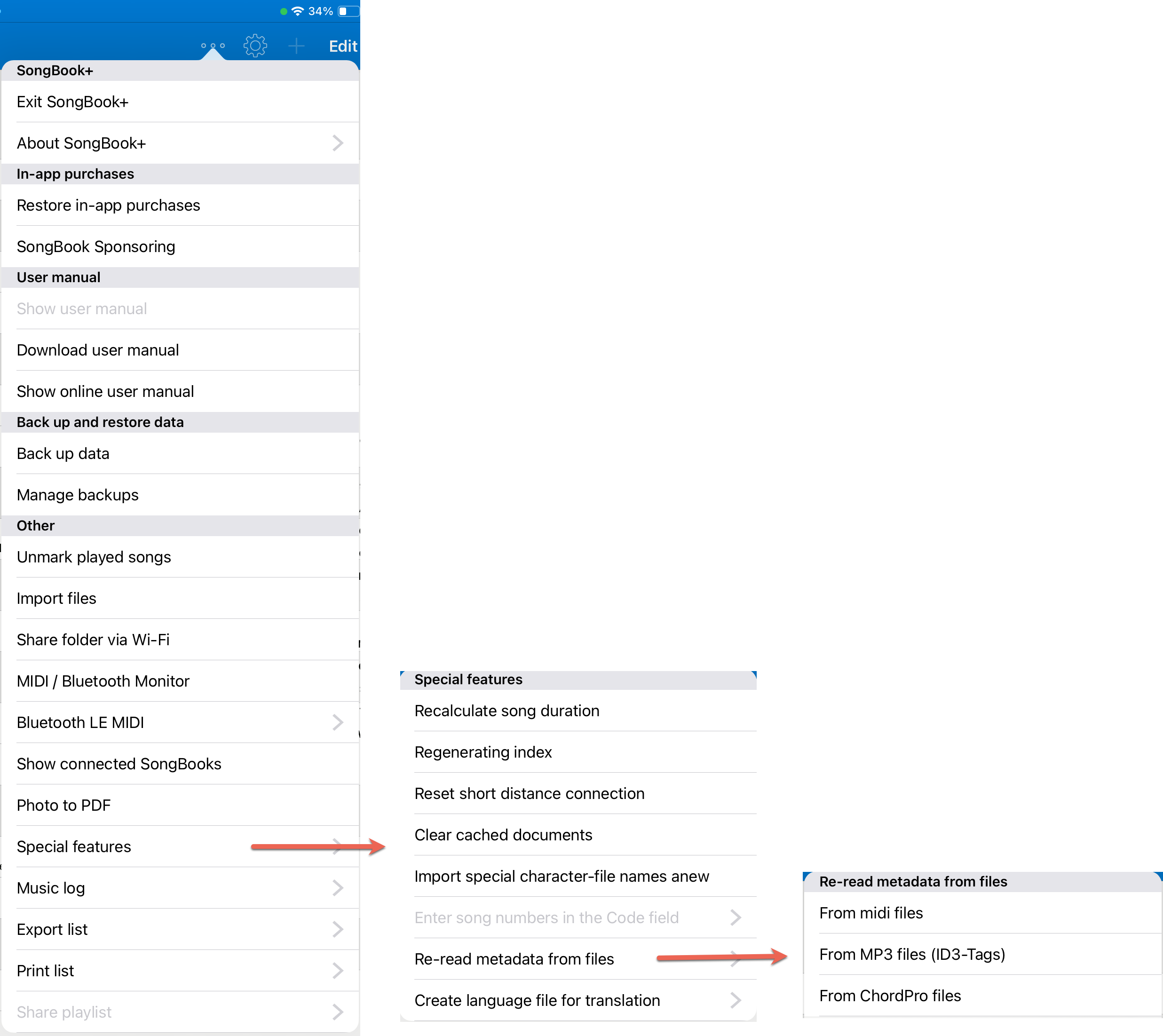
SongBook+ can now import metadata such as artist, genre, title, tempo, key and time signature from MIDI, MP3 or ChordPro files and automatically enter it in the song.
This can save a lot of work when creating new songs. Metadata can also be read again later for existing songs.
Keyboard Control at the Push of a Button
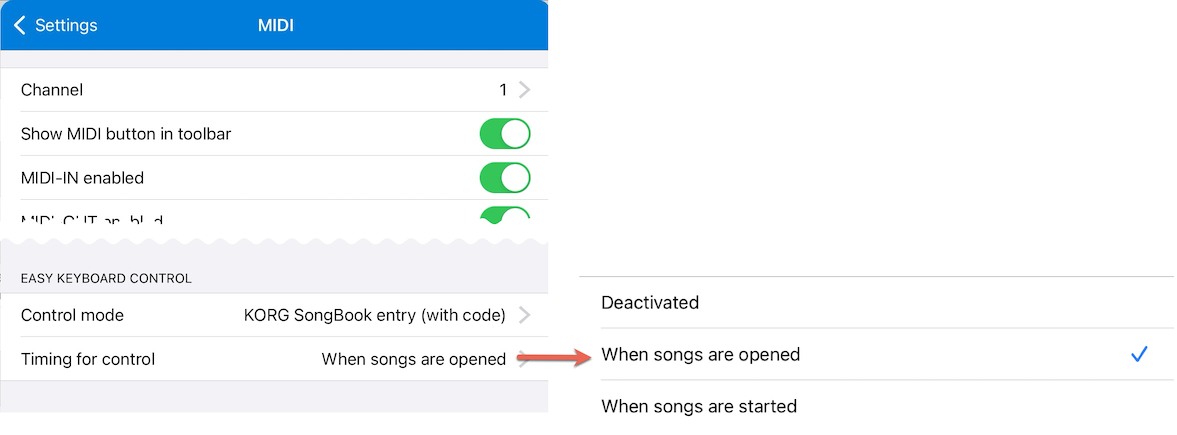
Previously, the commands for remotely selecting a registration suitable for the song on the keyboard were always sent to the keyboard when the song was opened.
Now you can choose whether these commands should be sent when the song is opened, only when it is started, or not automatically at all.
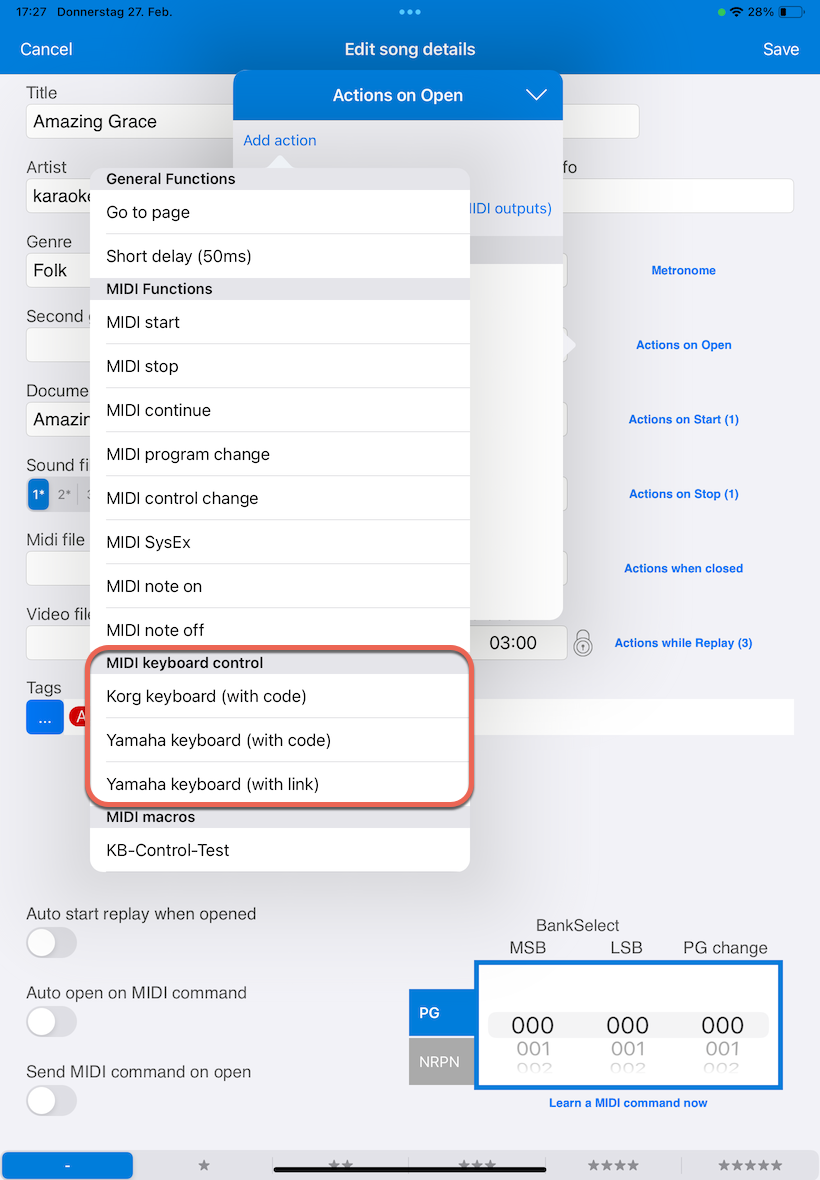
Instead of sending them automatically, these commands can also be sent via a function button. The command can also be entered in a MIDI macro under "Actions when songs are opened" or "Actions when songs are started", allowing you to control, for example, a Genos by link and a Tyros or Korg PA keyboard by code at the same time.
Ableton Link Support
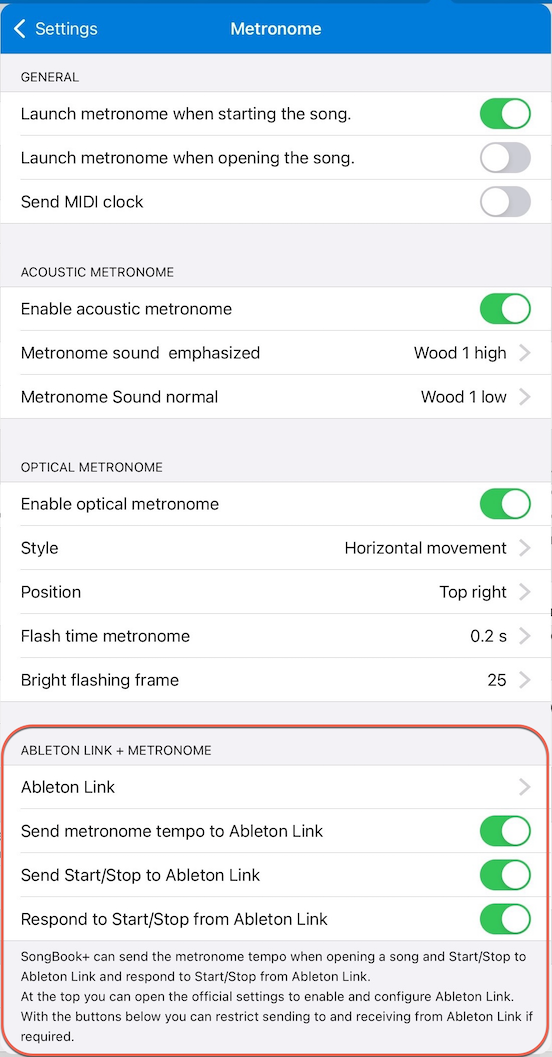
With Ableton Link, the song tempo and the current beat can be synchronized with other devices.
SongBook+ can now send the tempo set in the "Metronome" to other devices via Ableton Link when opening the song. SongBook+ can also send "Start" and "Stop" to other devices or respond to them.
For example, an external metronome can take over the tempo from SongBook+ and then be started in sync with SongBook+.
Since SongBook+ cannot change the playback tempo of songs, SongBook+ does not respond to tempo changes requested by other devices.
Improved Display of ChordPro Files
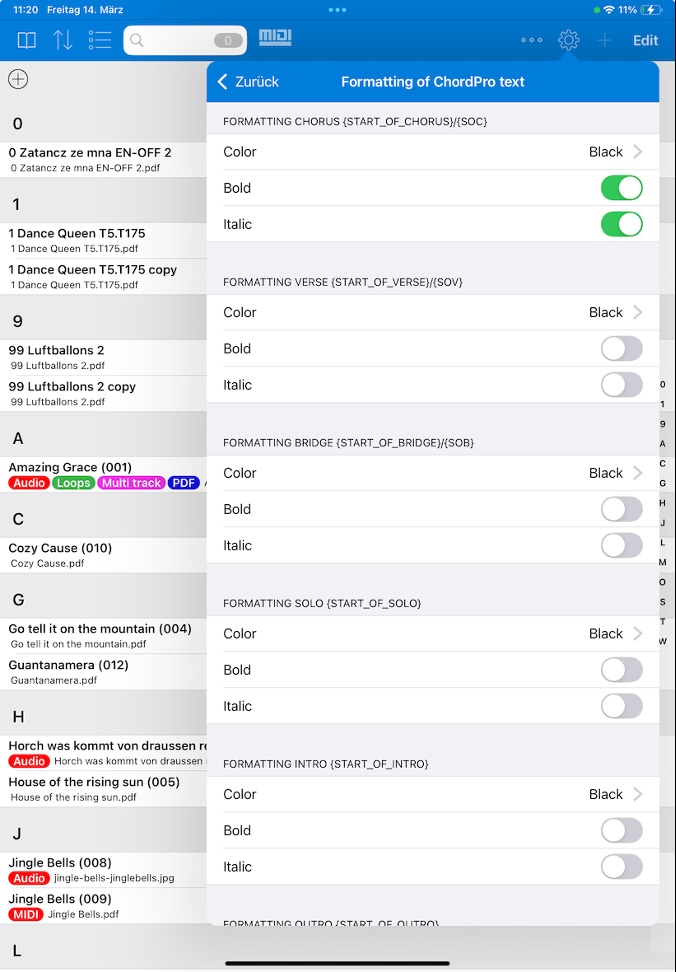
SongBook+ can now also use formatting information from ChordPro files and display sections such as chorus, verse and bridge in different colors, or in italic or bold.
Various directives in curly braces are used for this:
\{start_of_chorus\}/\{end_of_chorus\}or short\{soc\}/\{eoc\}\{start_of_verse\}/\{end_of_verse\}or short\{sov\}/\{eov\}\{start_of_bridge\}/\{end_of_bridge\}or short\{sob\}/\{eob\}\{start_of_solo\}/\{end_of_solo\}\{start_of_intro\}/\{end_of_intro\}\{start_of_outro\}/\{end_of_outro\}
In the settings under "Import lyrics and chords" - "ChordPro Text Formatting", the color can be set for each of these sections. In addition, you can define whether the section should be displayed in bold and/or italic.
Importing XF Chords with a Separate Bass Note
SongBook+ could already import XF chords from MIDI files before this update.
Now SongBook+ can also import the separate bass note for the chord, if available.
Alphabetically Sorted List of Books
Customers who make intensive use of SongBook+'s book feature and have created many books noticed that the list of books was not sorted alphabetically.
This list is now shown in alphabetical order.
Automatically Removing the Tag Filter After a Successful Search
When searching with text in the search field, there has long been a setting that defines what should happen to the entered text when the found song is opened and closed again.
The same was requested for searching with tags. That is why the settings of the "Search function" now include a switch that can automatically remove the tags from the search field after a successful search.
New Actions for Function Buttons, Gestures and Foot Pedals
At the request of customers, additional functions have been added for function buttons, gesture control or foot pedals:
- "Edit song"
- "Edit annotations"
- "Turn off all markers simultaneously"
- Enable, disable or toggle "Auto play"
The new action "Turn off all markers simultaneously" complements the existing action for toggling marker groups. For example, you can first turn off all markers and then selectively turn on specific markers.
Improved Foot Pedal Function for Function Button Groups
There has long been a foot pedal function "Press next function button group on page". This lets you step through all function buttons on a page with the foot pedal, group by group.
SongBook+ now remembers, for the foot pedal function that presses a specific group, that this was the last group pressed. If "Press next function button group on page" is used afterwards, SongBook+ continues from there.
Proportional Font Now Also Applies to ChordPro
The setting "Proportional font for MP3/MIDI/LRC/ChordPro import" previously only affected MP3, MIDI and LRC files.
However, there are also cases where ChordPro files are used space-savingly as text only, without the included chords. The lines then have less spacing.
This setting therefore now also applies to ChordPro files.